The Data Upload Approval feature adds an optional compliance layer to the file upload process during video creation.
When enabled for an account, it applies to all users within that account. A confirmation modal is displayed before file upload, and upload activity becomes available in Analytics reporting.
When activated, the feature ensures:
Explicit user acknowledgment before upload
Automatic blocking of restricted classifications
Organization-wide visibility of upload activity
If the feature is not enabled, the upload flow remains unchanged.
Confirmation before upload
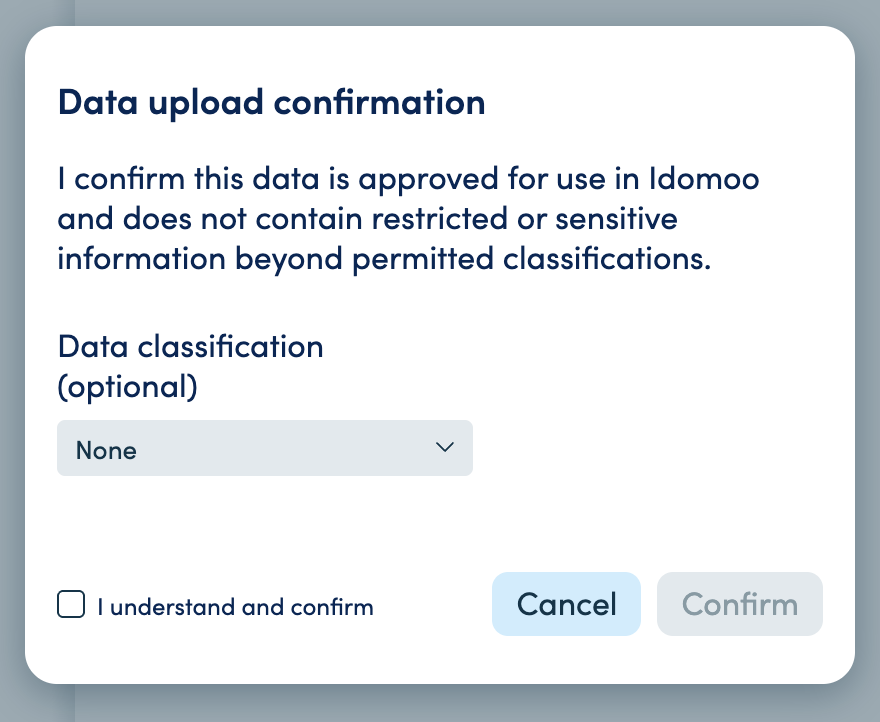
When the feature is enabled, users must confirm data approval before uploading files during video creation.
How it works
The user clicks Upload.
The local file browser opens.
After selecting a file and confirming, a confirmation modal appears.
The user selects a data classification.
The user must check “I understand and confirm” to proceed.
If Restricted is selected, the upload is blocked.
If another classification is selected and confirmed, the upload proceeds and is logged.
What is logged
Each confirmation generates a structured record including:
Video ID
Video title
User
Timestamp
File name
File size
Selected classification
Confirmation status
All records are stored as part of the upload activity log.
Upload activity reporting
When the feature is enabled, upload activity can be included in Analytics reports.
To generate the report:
Go to the Analytics dashboard.
Create a new report following the standard report creation process (see Managing Reports).
Under Advanced Settings, select Include DATA UPLOAD COMPLIANCE Report.
Once selected, the report will include upload activity data.
Report details
The report includes:
Video ID
Video title
User
Timestamp
File name
File size
Classification
Confirmation status
The report supports filtering and sorting according to the standard Analytics report configuration.